
Transactions
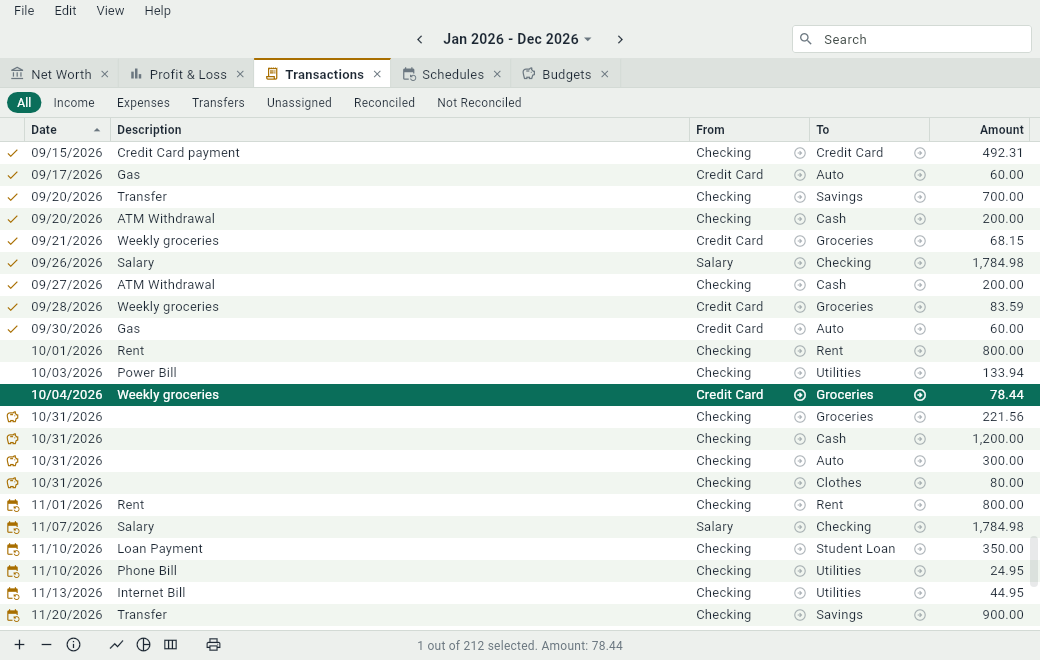
The Transactions tab lists every transaction of the date range, in the order of their dates, with a total at the bottom. It’s the quickest place to write down a pile of receipts: press Ctrl+N for each one and fill in its row. Open it with Ctrl+3 or ViewTransactions.
Reading a row
A row says: on this Date, this Amount went From one account To another. Money for groceries paid by debit card goes from “Checking” to “Groceries”; a salary goes from “Salary” to “Checking”. When a transaction has more than two lines, its accounts are listed one after the other, separated by commas.
| Column | What it shows |
|---|---|
| (status) | A mark for a special transaction: see below. |
| Date | The date of the transaction. |
| Check # | A check number or any other reference. Hidden at first. |
| Description | What the transaction is. |
| Payee | Who was paid, or who paid you. Hidden at first. |
| From | The account the money came from. |
| To | The account the money went to. |
| Amount | How much. |
| Modification Time | When the transaction was last changed. Hidden at first. |
Click in a From or a To cell to open that account. Sort the table by clicking the title of a column; click it again to sort the other way. Sorting by Modification Time is a good way to find what you changed lately, when a total doesn’t look right.
Marks
| Mark | The transaction... |
|---|---|
| is an occurrence of a schedule. | |
| is what is left of a budget. | |
| is reconciled in at least one of its accounts. | |
| is being changed to a date after or before the date range. |
Showing only some transactions
The buttons above the table keep only some of the transactions. Click All to see them all again.

| Button | Keeps the transactions that |
|---|---|
| Income | involve an income account. |
| Expenses | involve an expense account. |
| Transfers | move money between two of your assets or liabilities, like paying the credit card. |
| Unassigned | have a line without an account. |
| Reconciled | have a reconciled line. |
| Not Reconciled | have no reconciled line. |
To find transactions by what they say, use the search field at the top of the window.
Changing transactions
Double-click a cell, or select a row and press Enter, to change it right in the table. Ctrl+I opens the full details of a transaction, with all of its lines. See Entering transactions.