
Budgets
Some amounts can’t be scheduled but can be estimated: groceries, clothes, an evening out. A budget says how much you expect an income or an expense account to take each week, month or year. DovleEntry then counts what is left of it in the future, so that your balances show where they’re heading.
The Budgets tab lists your budgets. Open it with Ctrl+5 or ViewBudgets.
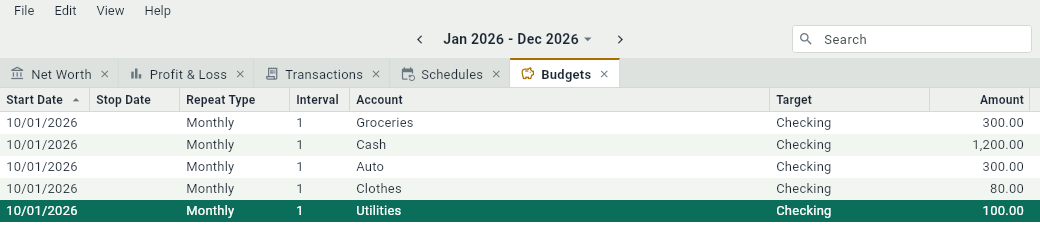
Creating a budget
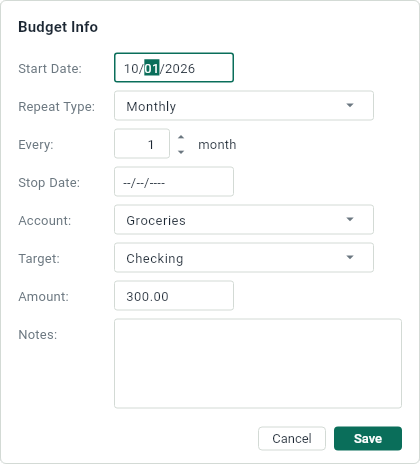
In the Budgets tab, press Ctrl+N. The panel of a budget asks for:
- Start Date, Repeat Type, Every, Stop Date: when the budget starts, how often it comes back and when it ends, as for a schedule. A monthly budget is the most common.
- Account: the income or expense account that the budget is for, like Groceries.
- Target: the asset or liability that the money comes from, or goes to, like Checking. It’s optional, but without it, the budget doesn’t show in the future balance of any account.
- Amount: how much, each time.
- Notes: anything to remember about it.
A budget needs an income or an expense account: create them first.
What a budget counts
A budget lives in the future. Each occurrence covers the period that ends on its date, and is worth what is left of the budget for that period: a monthly grocery budget of 300 with 80 already spent this month is an occurrence of 220 at the end of the month. When the budget is used up, its occurrence disappears; once its date has passed, it does too.
Every transaction of the account counts, whatever account it comes from: a target is where the budget expects the money to come from, not a limit. Groceries paid with your credit card count against a budget whose target is your checking account.
Occurrences appear among the transactions with the mark. They can’t be changed: change the budget instead, in the Budgets tab.
Where budgets show
- In the future balance of the Target account, in its tab and in the graphs.
- In the Budgeted column of Net Worth and of Profit & Loss: what the budgets still expect in the date range.
- In the future part of the graphs, in gray.