
Expenses by Month
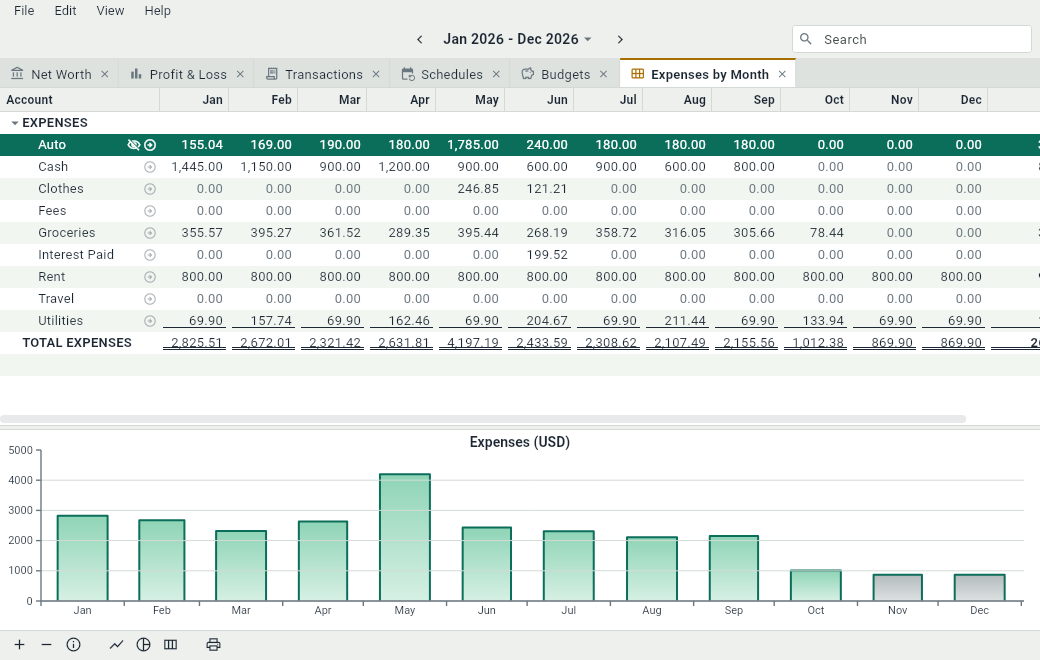
Expenses by Month lays out your spending as a calendar: a row for each expense account, under its groups, a column for each month of the date range, and the total of each row at the right. It’s the view for questions like “when do I spend the most?” or “did the electricity go up this winter?”. Open it with Ctrl+6 or ViewExpenses by Month, or with the button 7 of a new tab.
What it adds up
The amount of an account in a month is what the Current column of Profit & Loss gives for that account over that month: what its entries add up to, without the budgets. The rows of a group, of EXPENSES and of TOTAL EXPENSES add up their accounts month by month. As everywhere, an excluded account is left out of the totals, and amounts of zero are dimmed.
The columns follow the date range. A year gives twelve months, a quarter three. When the range starts or ends in the middle of a month, its first or its last column covers only that part of the month, and when the range spans two years, the titles of the months have their year.
The columns
The months all have the same width, the width that the longest amount needs. Drag the edge of one of them and they all follow. They stay in the order of the calendar: the months can’t be moved, only the other columns. Account # can be shown with .
The graph
Under the table, bars show what you spent in each month, or in each week when the range is shorter than 100 days. Show or hide them with or Ctrl+Alt+G. This view has no pie chart: the months need the width.