
Accounts and groups
Assets and liabilities are managed in the sheet of Net Worth, and income and expenses in the sheet of Profit & Loss. Everything on this page happens in one of the two.
Adding an account
Select the place where it goes and press Ctrl+N, or click . The new account takes the type of the selection, and its group if the selection is a group or an account in a group: select LIABILITIES to add a loan, or the group “Bank” to add a bank account to it. Type its name and press Enter.
Income and expense accounts also appear by themselves: when a transaction names an account that doesn’t exist, DovleEntry creates it, as an income or an expense depending on the side of the transaction. And if you then correct the name, the account that was created by mistake goes away as soon as nothing uses it.
The details of an account
Select an account and press Ctrl+I, or click , to open its panel.
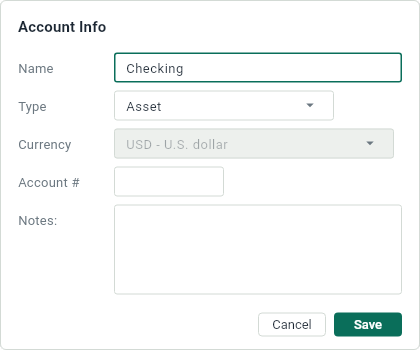
- Name: what the sheets and the transactions call the account.
- Type: asset, liability, income or expense. Changing it moves the account to the other sheet if it goes from the balance to the income statement, or back.
- Currency: the currency that the account counts its balance in. It can only change while none of its entries is reconciled, and changing it doesn’t change the currency of the amounts already in the account. See Currencies.
- Account #: a number for the account, if your accounting uses them: 1000 to 1999 for the assets, say. The number shows before the name in the tables, and you can type it in place of the name in a transaction.
- Notes: anything you want to remember about the account.
Groups
A group gathers accounts of the same type under a name, with a subtotal: “Bank” for your checking and savings accounts, “Home” for the rent and the electricity.
- To create one, select the type or an account of that type and press Ctrl+Shift+N. Type its name and press Enter.
- To put accounts in it, drag them onto it. Dragging an account onto a type, or onto a group of another type, changes its type too.
- To open or close it, click or , or press ← and →. In Profit & Loss, a closed group is a single slice of the pie chart.
- To remove it, select it and press Delete. Its accounts stay, outside of any group.
Removing an account
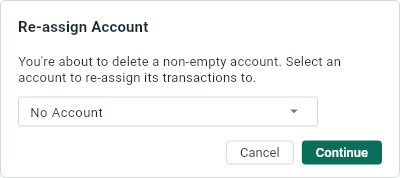
Select the account and press Delete, or click . If it has entries, DovleEntry asks what to do with them: give them to another account, or choose None to leave that side of their transactions unassigned.
Leaving an account out
An excluded account stays in the sheet, grayed out, but no total, graph or pie chart counts it: useful for an account you keep for the record, or to see your finances without your house. Select the account and click next to it, or press Ctrl+Shift+X; click to count it again. Expenses by Month and Expenses by Account leave out the same accounts, and you can exclude an expense account or include it again from them too. DovleEntry remembers the excluded accounts of each document.