Dates, amounts and completion
DovleEntry is made to be used from the keyboard. These are the details that save you keystrokes.
Dates
A date is typed in three parts, day, month and year, shown in the format of your regional settings or of the preferences. Whatever that format, typing always starts with the day, then goes on to the month and the year:
- Type the digits: when a part is full, the next one is selected. Typing the separator of your format, like
/, also goes to the next part. For the 6th of July 2026, type6/7/26, or060726. - ← and → go from one part to another; ↑ and ↓ add one to the selected part, or take one off.
- T gives today’s date.
A day that the month doesn’t have becomes its last day: typing the 31st in a month of 30 days gives the 30th.
When the new date is outside the date range, or says so before you keep it.
Amounts
- Calculations: type
24.99*3or100-12.50and the field keeps the result. The four operations and parentheses are allowed. - Currencies: an amount is in the native currency of the document, or, in the tab of an account in another currency, in the currency of that account. To give it any other currency, type its three letters before or after it:
200 EUR,eur 200. See Currencies. - Decimals: if you turn on Automatically place decimals when typing in the preferences, the last digits you type are the cents:
1234is 12.34. A decimal point you type still counts.
Completion
The Description, Payee and account cells (From, To, Transfer) complete what you type from your other transactions: the rest of the word appears, selected. Keep typing to ignore it, press ↑ and ↓ to go through the other possibilities, and Tab to take the one shown.
When you leave a description or a payee that was completed, DovleEntry also fills the cells at its right from the last transaction that had it: the accounts and the amount of your usual groceries, of your rent. Change what differs and press Enter.
Jumping to an account
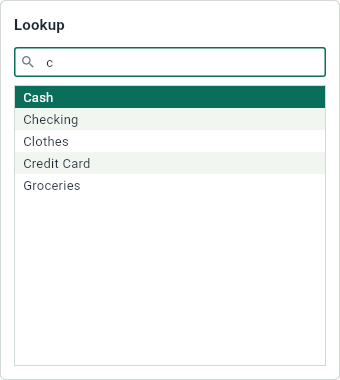
Ctrl+Shift+A, or EditJump to Account..., opens a list of all your accounts. Type a few letters of a name: the list keeps the names that start with them, then those that contain them, then those that contain the letters even apart. ↑ and ↓ choose one, and Enter opens its tab.