
Tabs and views
Each tab of the window shows a view of your document. A new document has five: Net Worth, Profit & Loss, Transactions, Schedules and Budgets. You can open more, close the ones you don’t use, and put them in any order.
The views
| View | What it shows | To show it |
|---|---|---|
| Net Worth | Your assets and liabilities, and your net worth. | Ctrl+1 |
| Profit & Loss | Your income and expenses over the date range. | Ctrl+2 |
| Transactions | Every transaction of the date range. | Ctrl+3 |
| Schedules | The transactions that repeat. | Ctrl+4 |
| Budgets | What you plan to spend or earn. | Ctrl+5 |
| Expenses by Month | Each expense account, month by month. | Ctrl+6 |
| Expenses by Account | Your expenses, from the largest. | Ctrl+7 |
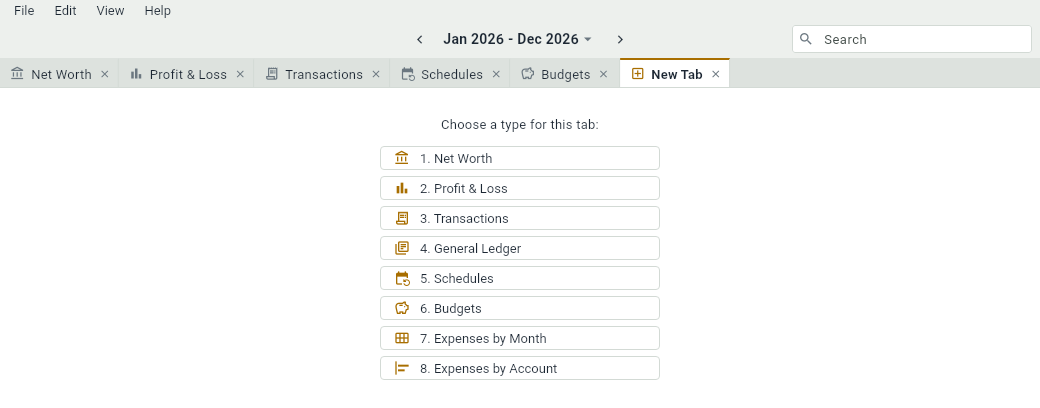
| General Ledger | The entries of every account, account by account. | A new tab, then 4 |
| An account | The entries of one account, with its balance. | next to the account |
The commands of the View menu, and their shortcuts, show the tab of that view if there’s one, and open it otherwise.
A new tab
Press Ctrl+T, or choose FileNew Tab, to open a tab that asks what it should show. Click one of its buttons, or press its number.
The tab of an account
Each account opens in a tab of its own. In Net Worth, Profit & Loss and the two views of expenses, click next to the account, double-click it, or select it and press Ctrl+]. In the Transactions tab and in the tab of an account, is in the cells that name an account. If the account already has a tab, that tab comes forward.
In the tab of an account, Ctrl+[ or EditGo Back takes you to Net Worth, or to Profit & Loss for an income or an expense account.
Moving around
- Click a tab to show it, or go to the next one or the previous one with Ctrl+Shift+→ and Ctrl+Shift+←.
- Drag a tab to move it among the others.
- Close a tab with the cross on it, a click with the middle button of the mouse, or Ctrl+W. The last tab of the window stays open.
When you open a document again, its tabs are the ones you left: DovleEntry remembers them, on your computer, for each document.