
Preferences
The preferences are the settings of DovleEntry on your computer, the same for all your documents. Open them with ViewPreferences.... Under them are the properties of the open document.
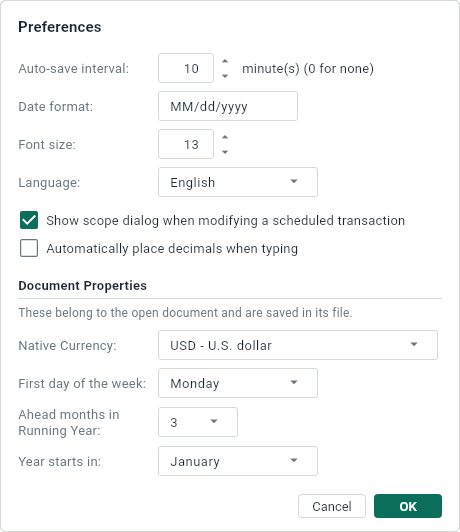
| Preference | What it does |
|---|---|
| Auto-save interval | How many minutes between two copies on the side of the open document. 0 makes none. |
| Date format | How dates are written: dd/MM/yyyy, MM/dd/yyyy, yyyy-MM-dd... dd is the day, MM the month, yyyy the year with four digits and yy with two. At first, it’s the short date of your regional settings. |
| Font size | The size of the text of the tables, from 9 to 24. |
| Language | The language of DovleEntry, and of this help when it’s written in it. |
| Show scope dialog when modifying a scheduled transaction | Whether DovleEntry asks how far a change goes when you change an occurrence of a schedule. Without the question, the change is for that occurrence, or for all the following ones if you hold Shift. |
| Automatically place decimals when typing | Whether the last digits you type in an amount are its cents: 1234 is 12.34. |
Click OK to keep your changes. A new date format or language takes effect the next time DovleEntry starts, and DovleEntry says so.
Document Properties
Each document has a few settings of its own, which it keeps in its file. They’re in the Document Properties section, under the preferences.
| Setting | What it changes |
|---|---|
| Native Currency | The currency of the totals, of the net worth and of the profit, and of the amounts you type without a currency. Type a few letters of a code or of a name to find it in the list. See Currencies. |
| First day of the week | Where a week starts in the graphs that show weeks, when the date range is shorter than 100 days. |
| Ahead months in Running Year | How far ahead of today the running year ends, from 0 to 11 months. |
| Year starts in | The month that a year starts in, for the Year and the Year To Date ranges: April for a fiscal year that runs from April to March. |
Unlike the preferences, they belong to the document: each document has its own. They apply when you click OK and, like any change to the document, they’re kept when you save it.